How to Improve Dust Collection on a DeWalt Orbital Sander
To improve DeWalt orbital sander dust collection, align the abrasive holes with the pad, clear the dust path, and fit a compatible bag or vacuum hose securely. Check airflow before sanding and keep the collection system emptied.
On this page (7 sections)
- How do you improve dust collection on a DeWalt orbital sander?
- Why does abrasive alignment matter?
- How should you attach a dust bag or vacuum hose?
- What should you check when airflow is weak?
- How can you reduce dust while sanding?
- Does dust collection work the same on other sanders?
- Which setup should you choose for DeWalt orbital sander dust collection?
To improve DeWalt orbital sander dust collection, align the abrasive holes with the pad, clear the dust path, and attach a compatible dust bag or vacuum hose. Empty the collector regularly and check the airflow before sanding.
Dust moves through openings in the abrasive and pad, then into the sander's collection system. A blocked path, loose connection, or mismatched pad can leave more dust on the work surface.
How do you improve dust collection on a DeWalt orbital sander?
Check the abrasive, pad, port, and collector in that order. Unplug the sander before inspecting it, then make sure the holes line up and the bag or hose fits securely.
- Remove the abrasive and inspect the pad holes for packed dust or damage.
- Fit a disc with a hole pattern that matches the pad.
- Press the disc down evenly so its holes stay aligned.
- Attach the correct dust bag or a compatible vacuum hose.
- Empty the collector and check that air can move through the system.
Test the setup on a scrap piece before sanding a finished surface. If dust still escapes heavily, stop and check the pad and port again.
Why does abrasive alignment matter?
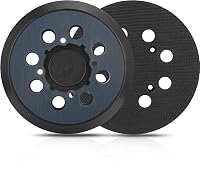
The abrasive holes need to sit over the pad openings for dust to pass through. If the holes are offset or covered, airflow can drop even when the bag is attached.
Match the disc's hole pattern to your pad before fastening it. Some sanding discs have no holes; these can block a through-pad collection path.
A multi-hole pattern may fit several pads, but it still needs to leave the sander's openings clear. Don't assume that a disc fits just because its diameter is right.
Can a replacement pad help with DeWalt orbital sander dust collection?
A correctly matched replacement pad may help when the current pad is damaged or its holes are clogged. Check the sander's model and the pad's hole layout before ordering.
The AxPower 5 inch 8 Hole Hook pad is described as compatible with DeWalt D26451 and several other models. That fit information does not include every DeWalt orbital sander, so confirm your model first.
If your sander takes a different pad, compare the best orbital sander replacement pad options and match the part to your tool. A pad that doesn't fit can leave the abrasive loose or block the dust openings.
How should you attach a dust bag or vacuum hose?
Seat the collector firmly on the dust port without forcing the connection. A loose bag or hose can leak dust and may detach while you work.
The DeWalt N273733 replacement dust bag is compatible with the DWE6421, DWE6420, DWE6411, and other listed models. Check the compatibility information against your sander before choosing a replacement.
For a bag that needs replacing, see our guide to the best DeWalt orbital sander bag. If you're troubleshooting a D26451, compare the best DeWalt orbital sander parts for the D26451 and verify that a part matches your tool.
A shop vacuum can collect dust through a compatible hose connection. Check your manual for the port and adapter requirements, and support the hose so its weight doesn't pull on the sander.
What should you check when airflow is weak?
Look for a full bag, blocked openings, or a loose connection first. Switch off and unplug the sander before clearing dust or adjusting parts.
Fine dust can pack around the pad openings or collector inlet. Brush away loose debris carefully, and don't push anything into the sander's internal passages.
Check that the bag isn't full and the hose isn't kinked. If the pad is worn or cracked, replace it with a model-specific part rather than trying to patch it.
How can you reduce dust while sanding?
Use a compatible collector and keep the dust path open throughout the job. Sand with steady movement, avoid pressing harder than needed, and empty the bag before it becomes packed.
Dust collection helps keep debris closer to the tool, but it doesn't capture every particle. Wear suitable respiratory and eye protection, and follow the instructions for your sander and collection system.
For more on choosing a sander for the job, read about the different types of sanders. A belt sander vs orbital sander comparison can also help you choose between faster material removal and finer surface work.
Does dust collection work the same on other sanders?
The same basics apply, but ports and collection setups vary by tool. Match the abrasive openings and fittings to the specific sander rather than assuming parts are interchangeable.
A drum sander may use a larger collection setup; see our guide to drum sander dust collection for that tool. For stationary sanding, compare the best belt and disc sanders for woodworking.
Which setup should you choose for DeWalt orbital sander dust collection?
For DeWalt orbital sander dust collection, start with aligned abrasive holes and a clear path to a securely attached collector. Choose a replacement bag when your model supports it, or use a compatible vacuum connection if your manual allows one.
If dust escapes, check alignment and airflow before buying parts. Replace a worn pad or bag only after confirming the replacement matches your exact sander model.
Frequently asked questions
Why is my DeWalt orbital sander not collecting dust?
Start by checking that the abrasive holes line up with the pad holes and that the dust bag or hose is seated securely. Empty the bag and clear visible blockages with the sander unplugged.
If collection stays weak, inspect the pad and connection for damage and check your model's manual.
Can I connect a vacuum to a DeWalt orbital sander?
You may be able to connect a vacuum if its hose fits the sander's dust port or a suitable adapter. Check your sander manual for compatible connections, then confirm that the hose stays attached and airflow is not blocked before sanding.
Do sanding discs need holes for dust collection?
For a through-pad dust collection system, use an abrasive with holes that match the pad. A solid abrasive can cover the openings and restrict dust flow.
Align the holes before pressing the hook-and-loop disc into place.
Does a replacement sanding pad improve dust collection?
A replacement pad can help if the original pad is worn, damaged, or its holes are blocked, but it must match your exact sander model. Compare the model and hole layout before buying, since a pad that does not fit can prevent proper alignment.