How to Use a Bosch Router Guide
To use a Bosch router guide, attach a compatible guide firmly, set the offset from the bit to the guide edge, and make controlled passes. Test the setup on scrap wood before routing the workpiece.
On this page (10 sections)
- What does a Bosch router guide do?
- What should you check before attaching the guide?
- How do you attach a Bosch router guide?
- How do you use the guide for a straight cut?
- How do you use the guide with a router table?
- Should you use a plunge or fixed-base Bosch router?
- How can a router table improve guide control?
- What safety checks should you make before routing?
- How do you maintain a Bosch router guide setup?
- What is the simplest Bosch router guide setup?
To use a Bosch router guide, attach a compatible guide firmly, set the offset from the bit to the guide edge, and make controlled passes. Test the setup on scrap wood before routing the workpiece.
A guide turns the router's base or edge into a reference point. The key is to measure the distance between that reference point and the bit, then keep the guide in steady contact as you move the router.
What does a Bosch router guide do?
A Bosch router guide keeps the router on a repeatable path while you cut. It can help with straight edges, grooves, pattern work, and repeated offsets when the guide fits the router base and the job.
The guide does not replace a sharp bit, a stable workpiece, or a safe feed direction. It only gives you a reference surface or line to follow.
For a wider look at router shapes, bases, and common jobs, see our guide to wood routers for woodworking. It can help you decide whether a fixed-base, plunge, compact, or table setup suits the cut.
What should you check before attaching the guide?
Before attaching a Bosch router guide, check the router model, base, attachment points, bit size, and guide instructions. Remove the battery or unplug the router while fitting or adjusting parts.
Inspect the guide for loose hardware, damage, or movement. Clean dust from the base and attachment area so the guide sits flat.
Check the bit's shank and the router's collet. For example, the Hiltex set uses 1/4 in shanks, so it requires a router with a 1/4 in collet.
The Hiltex set includes 4 straight bits, 2 core box bits, a cove bit, V-groove, mortising, roundover, dovetail, Roman ogee, chamfer, panel pilot, and flush trim bits. Select bits have ball bearing guides for edge work.
Keep each bit in its labeled case slot after use. A clean, undamaged bit is easier to inspect before you set the guide.
How do you attach a Bosch router guide?
Attach a Bosch router guide by placing it against the router base or approved mounting points, tightening the hardware evenly, and checking that it cannot shift. Keep the router unplugged or disconnected during this step.
Hold the guide in its intended position while tightening. If it has adjustable rods, plates, or an edge, keep those parts square to the base unless the instructions call for another angle.
After tightening, hold the router by its handles and gently check the guide for movement. Any play can change the cut and may let the bit move closer to the workpiece than planned.
If you need another base or attachment, our guide to the best router attachments for wood covers common ways to adapt a router for different tasks. Confirm the attachment's fit before relying on it for a cut.
How should you adjust the guide offset?
Adjust the guide offset by measuring from the bit's cutting edge to the guide's contact edge. The correct distance depends on where you want the groove, trim line, or routed profile to sit.
Use the actual bit installed in the router when measuring. A larger or smaller bit changes the relationship between the guide and the cut.
Make a mark on scrap wood that matches the intended cut. Place the guide against the reference edge, make a shallow pass, and measure the result.
Move the guide in small increments until the cut lands in the right place.
A base plate can also affect the reference distance. See the best trim router base plate if your work depends on a stable base and controlled edge contact.
How do you use the guide for a straight cut?
To use a Bosch router guide for a straight cut, clamp the workpiece, keep the guide against the reference edge, and move the router at a steady pace. Start with a shallow pass if the bit needs to remove a lot of wood.
Support the workpiece so it cannot rock or shift. Keep the guide in contact with the edge without pushing so hard that the router tilts.
Move in the direction that keeps the bit's rotation working with your control of the router. If the router pulls away from the guide, stop and reassess the setup rather than forcing the cut.
Several light passes can give you more control than one deep pass. Clear dust often enough to keep the reference edge visible.
How do you use the guide with a router table?
A router table changes the work method because the router is mounted below the table and the workpiece moves across the bit. In that setup, use the table fence and featherboards as the main guides, with the router table instructions controlling the adjustment.
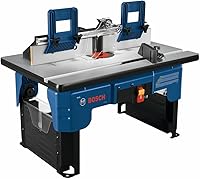
The BOSCH RA1181 has a 27 in x 18 in aluminum top, a rigid aluminum mounting plate, an extra tall aluminum fence, adjustable faceplates, and featherboards. Its dedicated dust port fits standard 2-1/2 in vacuum hoses.
The RA1181 also has an accessory slot for 3/4 in optional accessories, a storage pocket, and cord-wrap storage. Its mounting plate is pre-drilled for compatibility with a variety of routers and above-table height adjustment with many common routers.
Use the fence for straight stock and the starter pin and guard for curved workpieces when the setup calls for them. Read the table and router instructions before making adjustments above or below the work surface.
For the table-specific process, see how to use a Bosch router table. A table guide and a handheld edge guide solve related problems, but they are not adjusted in exactly the same way.
Should you use a plunge or fixed-base Bosch router?
Choose a fixed base when the bit should begin at a set depth from an edge, and choose a plunge base when the cut must start inside the workpiece. The right choice depends on how the cut begins and ends.
A fixed-base setup is often easier for edge routing because the base stays at a set height. A plunge setup lets you lower the bit into the material after the router is running, which suits stopped grooves and interior cuts when the router and guide support that method.
Our comparison of plunge router vs fixed base explains the trade-off. Check the router manual for plunge depth, guide attachment, and bit limits before starting.
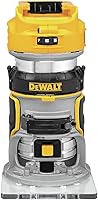
A cordless compact router may suit lighter edge work where portability matters. See the best cordless compact router guide if you are comparing smaller handheld options.
How can a router table improve guide control?
A router table can improve guide control by supporting the workpiece against a fence while featherboards help keep it aligned. It also gives you a larger surface for repeated edge work.
The BOSCH RA1171 uses a cabinet-style design with a smooth laminated top, a rigid aluminum mounting plate, an extra tall fence, adjustable MDF faceplates, and featherboards. It has one dust port at the fence and another at the cabinet.
The RA1171 includes mounting hardware, a clear guard, a starter pin, a starter pin guard, 2 adjustable featherboards, 2 outfeed fence shims, and 3 mounting plate insert rings. Its base has 4 predrilled holes for screws, plus a flat extension for clamping to a workbench.
Choose the RA1171 when stability, storage, and dust management matter more than a compact benchtop footprint. Choose the RA1181 when you want a benchtop table with a large aluminum top and portable design.
What safety checks should you make before routing?
Before routing, secure the workpiece, confirm the guide is locked, check the bit, and keep the router moving under control. Wear the protection required by your router's instructions and manage dust with suitable collection equipment.
Keep hands away from the bit and do not reach across a running router. Wait for the bit to stop before setting the router down or clearing chips.
Make sure the guide cannot catch on the workpiece. Remove clamps, scraps, and other objects that could interfere with the router's path.
Bosch provides tool information through its official power tools resources, including instructions that should take priority for your specific model.
How do you maintain a Bosch router guide setup?
Maintain the setup by cleaning dust from the base, guide, fence, and mounting hardware after use. Check screws, guide surfaces, featherboards, and plates before the next project.
Inspect bits for damage and keep carbide edges free of packed resin or dust. Store bits in their case, and keep router accessories in a dry place.
Replace or repair any part that no longer holds its position. For model-specific components, use the best Bosch router replacement parts as a starting point.
If you are adding dust control, storage, or other setup pieces, compare the best Bosch router accessories before changing the work area.
What is the simplest Bosch router guide setup?
The simplest Bosch router guide setup is a compatible guide, a suitable bit, a firmly clamped workpiece, and a measured offset tested on scrap. Make shallow passes and keep the guide in steady contact with the reference edge.
Choose the Hiltex set when you need several 1/4 in shank wood-routing profiles. Choose the RA1181 for a portable benchtop table with an aluminum top and 2-1/2 in dust port.
Choose the RA1171 when cabinet-style stability, storage, and dual dust ports fit your workshop.
For your next step, use the best Bosch router accessories to match the guide, base, dust collection, and table parts to your router model.
Frequently asked questions
What is a Bosch router guide used for?
A Bosch router guide helps you keep the router or its base at a set distance from an edge, template, or reference line. That controlled offset makes it easier to cut grooves, trim edges, follow patterns, and repeat the same route.
Match the guide to your Bosch router and bit before starting.
How do you set the offset on a Bosch router guide?
Set the offset by measuring from the router bit's cutting edge to the guide's contact edge. Account for the router base, guide position, and bit diameter, then lock the guide in place.
Make a shallow test cut in scrap wood and adjust the guide before routing the final piece.
Can you use a Bosch router guide with every router?
No. Compatibility depends on the router model, base, guide attachment, collet, and bit size.
Check the instructions for your Bosch router and the guide before fitting it.
A guide that mounts to one base may not attach to another, even when both tools are made by Bosch.
How do you make a straight cut with a Bosch router guide?
Clamp the workpiece, attach the guide, set the offset, and place the router so the guide stays against the reference edge. Start the router before entering the wood, move at a steady pace, and take shallow passes when material removal is heavy.
Confirm the result on scrap first.