How to Use a DeWalt Orbital Sander
To use a DeWalt orbital sander, fit hook-and-loop paper to the 8-hole pad, connect the dust bag or vacuum, set the speed, and keep the tool moving. Start with light pressure and a coarse grit only when needed, then switch to finer paper for the final surface.
On this page (9 sections)
- What should you do before using a DeWalt orbital sander?
- How do you fit paper to the DeWalt sanding pad?
- How do you attach dust collection?
- How do you set the speed?
- What is the correct sanding technique?
- Which DeWalt features help during longer sanding jobs?
- What other orbital sanders may fit this job?
- How do you avoid common sanding mistakes?
- What is the best way to use a DeWalt orbital sander?
To use a DeWalt orbital sander, fit the abrasive paper flat, connect dust collection, choose a suitable speed, and guide the tool without forcing it. Keep the pad moving while it runs, and use progressively finer paper as the surface becomes smoother.
The DeWalt 20V MAX Orbital Sander, model DCW210B, is a cordless 5 in random orbital sander with an 8-hole hook-and-loop pad. Its variable-speed control runs from 8,000 to 12,000 OPM, so you can adjust the pace for removal, shaping, or finish sanding.
If you're new to this type of tool, start with our guide to different types of sanders to see how orbital sanders compare with detail, belt, and hand sanders.
What should you do before using a DeWalt orbital sander?
Secure the workpiece, inspect the abrasive, and make sure the sander is powered off before setup. Clamp a board or place it on a stable workbench so the piece cannot slide as you guide the tool.
Check the sanding pad for damage and choose paper that matches the job. Coarse paper removes material faster, while fine paper leaves a smoother surface but works best after deeper marks and old finish are gone.
For more paper and tool guidance, see our comparison of the best random orbital sander for woodworking. The right choice depends on the surface, the amount of material to remove, and whether you need cordless movement.
Remove the battery before fitting paper or clearing dust. The DCW210B is battery powered, and its battery and charger are sold separately.
How do you fit paper to the DeWalt sanding pad?
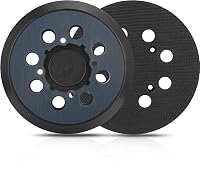
Press a clean 5 in hook-and-loop sanding disc onto the 8-hole pad, with the holes aligned. Start at one edge, lower the disc carefully, and press across the surface so it sits flat without wrinkles.
The holes support dust movement through the pad. Misaligned holes can reduce collection, while a loose edge can catch on the workpiece.
Replace paper when the abrasive is clogged, torn, worn smooth, or no longer holds to the pad. Do not use a disc that lifts during a dry check, because a loose abrasive can damage the surface.
A replacement PSA pad is available for the DCW210B as service part N373679. That is different from the standard hook-and-loop setup, so confirm the pad type before ordering replacement paper.
How do you attach dust collection?
Attach the one-handed locking dust bag for simple cleanup, or connect the dust port to a compatible collector. The DCW210B is designed to fit directly to DeWalt DWV010 and DWV012 dust collectors.
For another vacuum system with a 1-1/4 in hose, DeWalt specifies the DWV9000 Universal Quick Connector. Keep the hose routed behind or beside the tool so it does not pull the sander off line.
Dust collection reduces airborne debris, but it does not replace eye protection, hearing protection, and suitable respiratory protection for the material and workspace. Follow the sander and vacuum instructions, and never sand coatings that may release harmful dust without the correct controls.
Empty the dust bag before it becomes packed. A full bag can reduce airflow and make the work area harder to keep clean.
How do you set the speed?
Start with a lower speed, then raise it only when the surface and abrasive need more cutting action. The DeWalt DCW210B covers 8,000 to 12,000 OPM through its variable-speed control.
Lower speeds give you more control near edges and on delicate surfaces. Higher speeds can help with faster removal, but watch for heat, clogged paper, or surface marks.
Make a short test pass on a hidden area or scrap of the same material. Check the surface before continuing across the visible face.
What is the correct sanding technique?
Set the pad flat, start the tool before touching the workpiece, and move in slow overlapping passes. Keep both hands comfortable on the grip when needed, but do not press down hard.
Move with the grain when working on wood, even though random orbital action reduces visible swirl marks. Overlap each pass so narrow unsanded strips do not remain between tracks.
Do not stop the running sander in one place. A stationary pad can create a low spot or uneven finish, especially on soft wood and edges.
Lift the sander from the surface before switching it off. This helps prevent a stopped abrasive from leaving a concentrated mark.
For a full general sequence, read how to use a random orbital sander. The same basics apply: stable work, light pressure, a moving pad, and a planned grit progression.
Which DeWalt features help during longer sanding jobs?
The DCW210B combines a low-profile body, a brushless motor, variable speed, and a texturized rubber overmold grip. The low profile helps you stay close to the work surface, while the grip gives you a controlled holding point.
Its dust-sealed switch is designed to protect against dust ingestion. The tool also has a one-handed locking dust bag for collection when a vacuum is not connected.
The 2.5 lb tool weight can suit readers who want a cordless sander that is easier to move around a project. The trade-off is that the battery and charger are separate, so you need the compatible power setup before work begins.
If you prefer a corded tool, compare the best corded random orbital sander options. Corded sanders avoid battery changes, while cordless tools can be easier to move around a large workpiece.
What other orbital sanders may fit this job?
The SKIL SR211601 suits readers who want a corded 5 in sander with variable speed and a cyclonic dust box. It has a 2.8 amp motor, 7,000 to 13,000 OPM, a transparent X-flow dust container, and a 3-piece sanding sheet set.
Its compact design and soft rubber grip can help when you need control in tighter spaces. Use the speed dial to slow the tool for detail work or increase it for faster removal, while keeping the pad flat.
The BLACK+DECKER BDERO100 suits readers who want a compact corded 5 in orbital sander with a built-in dust bag. It uses a 2.0 amp motor, reaches 12,000 OPM, and includes 1 sanding sheet and 1 dust bag.
Its dust-sealed switch and comfort grip support straightforward surface preparation. The fixed 12,000 OPM speed gives you less adjustment than the DeWalt or SKIL, so control comes from your paper choice, pressure, and movement.
For another cordless comparison, see the best Makita random orbital sanders. If your project needs a different tool altogether, our guide to wood routers for woodworking explains when routing is a better fit than sanding.
How do you avoid common sanding mistakes?
Keep the pad flat, use light pressure, and change clogged paper before it starts marking the surface. These three habits prevent many uneven results.
Do not tilt the tool to use one edge of the disc. A tilted pad can cut a groove or round over an edge faster than expected.
Do not skip directly from very coarse paper to very fine paper when deep scratches remain. Move through sensible grit steps and remove the marks from the previous grit before changing again.
Vacuum or wipe the surface between grits. Loose dust can act like a larger abrasive and make it harder to judge whether the previous scratches are gone.
A hand sander can help with corners and small areas that a round pad cannot reach. Learn what a hand sander is and how to use a hand sander before switching tools.
What is the best way to use a DeWalt orbital sander?
Choose the DeWalt DCW210B when cordless movement, variable speed, a low profile, and direct DeWalt dust-collector connections matter most. Fit the 8-hole paper carefully, start at a low speed, keep the tool moving, and let the abrasive do the work.
Choose the SKIL if you want a corded tool with a wider 7,000 to 13,000 OPM range and cyclonic dust box. For another brand option, compare Bosch orbital sanders.
Choose the BLACK+DECKER if you want a compact corded option with a fixed 12,000 OPM speed and included dust bag.
For a smaller task or tight corner, switch to a hand sander instead of forcing the orbital pad into the space. A detail sander can reach corners that a 5 in orbital pad cannot.
Use the DeWalt for broad, controlled passes where its 5 in pad and dust options match the work.
Frequently asked questions
How do you attach sandpaper to a DeWalt orbital sander?
Turn off the sander, unplug it or remove its battery, and press the hook-and-loop paper onto the 8-hole sanding pad. Align the holes with the pad openings, smooth the sheet flat, and replace paper that is curled, torn, clogged, or no longer holding securely.
Can you connect a DeWalt orbital sander to a shop vacuum?
Yes, the DeWalt DCW210B dust port fits DWV010 and DWV012 dust collectors directly. For other vacuum systems with 1-1/4 in hoses, DeWalt specifies the DWV9000 Universal Quick Connector.
Check the vacuum connection before sanding and keep the hose clear of the workpiece.
What speed should you use on a DeWalt orbital sander?
Use a lower speed for delicate surfaces, heat-sensitive finishes, or better control near edges, and increase it when you need faster material removal. The DCW210B has variable speed from 8,000 to 12,000 OPM, so begin low and adjust after checking the surface.
How much pressure should you use with an orbital sander?
Use only enough pressure to keep the pad flat and guide the tool. Heavy pressure can slow the sanding action, clog paper, and leave uneven marks.
Let the abrasive do the cutting while you move in overlapping passes across the workpiece.